Fixing Mismatches: Helping QuickBooks Online Customers in Data Mismatch Issues

The problem
The problem
When users migrate payroll data from QuickBooks Desktop to QuickBooks Online, they frequently encounter data discrepancies. The current post-migration hub shows these discrepancies but doesn't offer a way to fix them, forcing users to frustratingly cross-verify reports between both versions.
When users migrate payroll data from QuickBooks Desktop to QuickBooks Online, they frequently encounter data discrepancies. The current post-migration hub shows these discrepancies but doesn't offer a way to fix them, forcing users to frustratingly cross-verify reports between both versions.
People Impacted
People Impacted
The people impacted by this problem were small and medium business owners who had recently migrated to QuickBooks Online from Desktop and used payroll services to manage their payroll.
The people impacted by this problem were small and medium business owners who had recently migrated to QuickBooks Online from Desktop and used payroll services to manage their payroll.
Business Goals
Business Goals
Provide a way for users to fix data mismatches after migration. Enhance the migration experience to increase the overall Product Retention Score and conversion of potential users from QuickBooks Desktop to QuickBooks Online.
Provide a way for users to fix data mismatches after migration. Enhance the migration experience to increase the overall Product Retention Score and conversion of potential users from QuickBooks Desktop to QuickBooks Online.
Design Process
Design Process
Delight for Design
Delight for Design
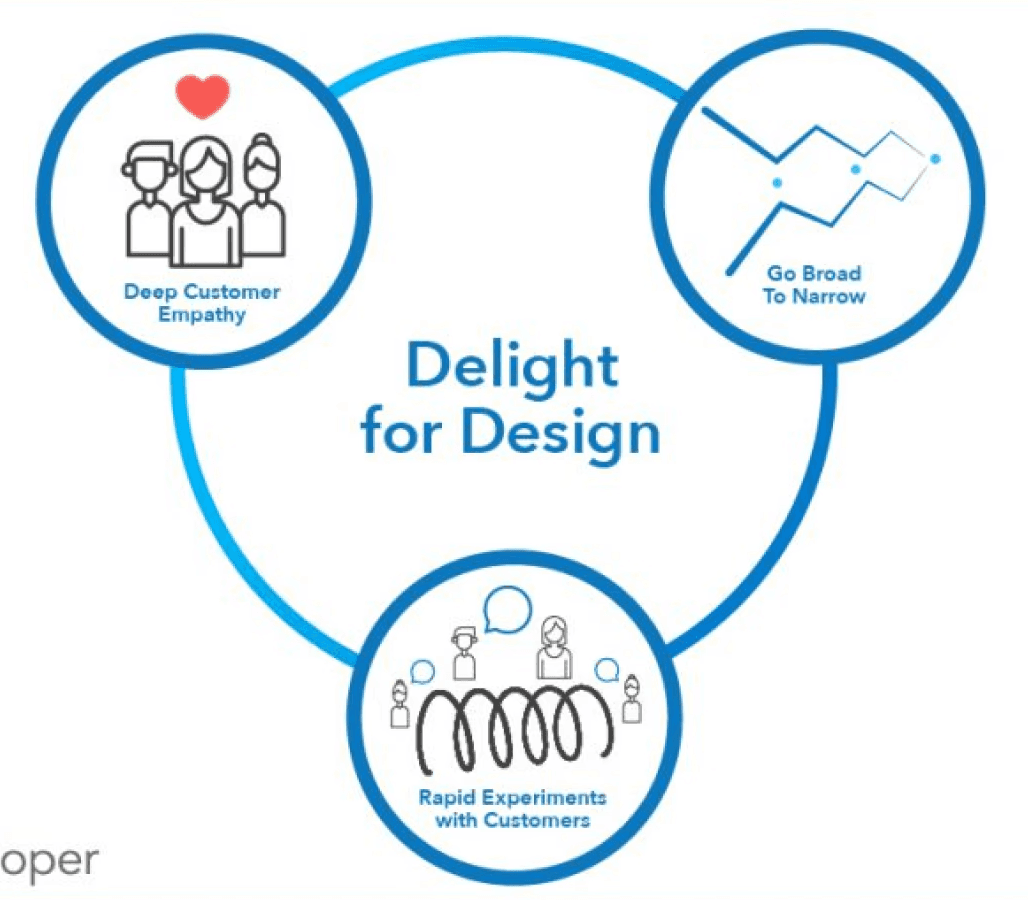
Design for Delight (D4D) is a framework based on three principles: Deep Customer Empathy, Go Broad to Go Narrow, and Rapid Experimentation. It focuses on understanding customer needs, generating diverse ideas, and quickly testing them for refinement.
Design for Delight (D4D) is a framework based on three principles: Deep Customer Empathy, Go Broad to Go Narrow, and Rapid Experimentation. It focuses on understanding customer needs, generating diverse ideas, and quickly testing them for refinement.

My role
My role
As the solo product designer for the post-migration hub redesign, I collaborated with cross-functional teams and led both customer studies and design delivery, transforming a manual, fragmented process into a streamlined, transparent experience.
As the solo product designer for the post-migration hub redesign, I collaborated with cross-functional teams and led both customer studies and design delivery, transforming a manual, fragmented process into a streamlined, transparent experience.
01
01
Initial state
Initial state
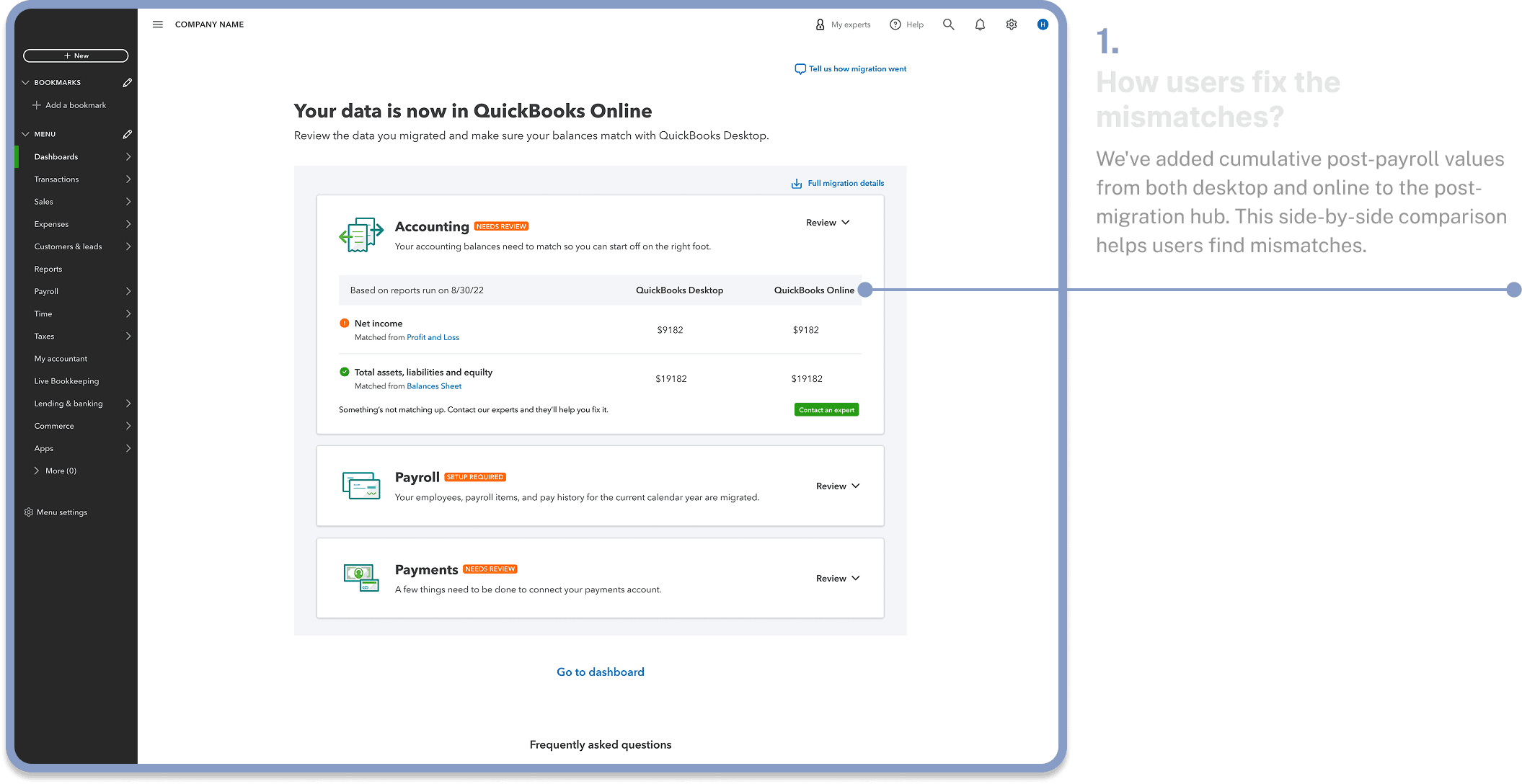
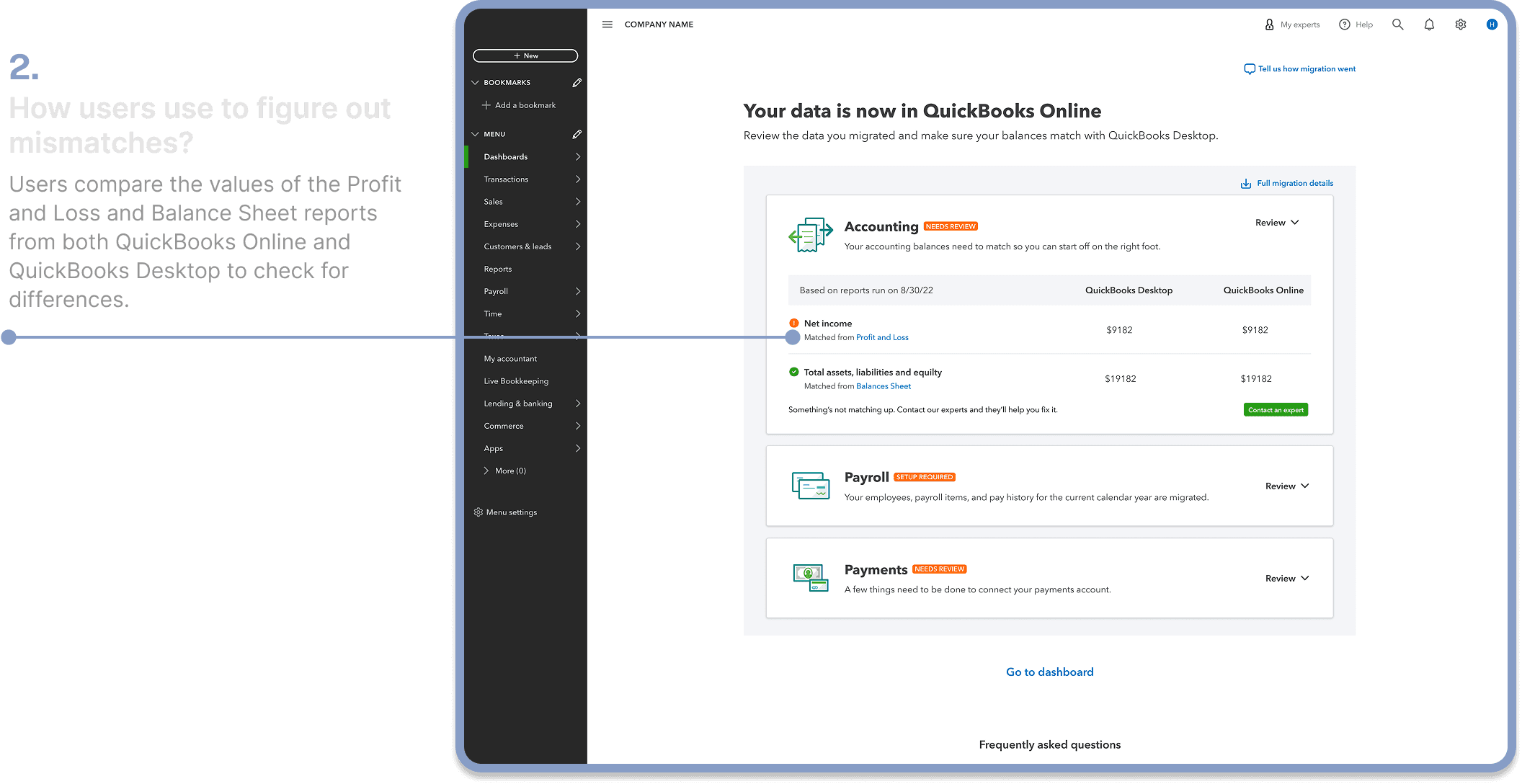
The initial state of the post-migration hub had sections for accounting, payroll, and payments. These sections displayed comparative values from relevant reports, along with links. In cases of a mismatch, users had to download these reports and manually compare each line item with the corresponding report from QuickBooks Desktop to identify the data set. This was a frustrating and labor-intensive process for users.
The initial state of the post-migration hub had sections for accounting, payroll, and payments. These sections displayed comparative values from relevant reports, along with links. In cases of a mismatch, users had to download these reports and manually compare each line item with the corresponding report from QuickBooks Desktop to identify the data set. This was a frustrating and labor-intensive process for users.
02
02
The gap
The gap
The post-migration hub gives feedback on users' accounting and payroll data, but it doesn't provide the exact locations of the discrepancies or a way to fix them.
03
03
Insights from the previous user studies
Insights from the previous user studies
Feedback
Feedback
01
01
Users expects a detailed post-migration reports
Users expects a detailed post-migration reports
Users want more detailed post-migration reports to pinpoint data mismatches, rather than just a high-level overview. They currently have to manually compare QuickBooks Online and Desktop reports to find the specific discrepancies.
Users want more detailed post-migration reports to pinpoint data mismatches, rather than just a high-level overview. They currently have to manually compare QuickBooks Online and Desktop reports to find the specific discrepancies.
02
02
They want a ways to fix discrepancies
They want a ways to fix discrepancies
The current state of the post-migration hub doesn't provide a way to fix these mismatches. Users have to manually go to a specific place in QuickBooks Online and adjust the data themselves.
The current state of the post-migration hub doesn't provide a way to fix these mismatches. Users have to manually go to a specific place in QuickBooks Online and adjust the data themselves.
03
03
Manual data verification is a burden for users
Manual data verification is a burden for users
Users are finding it difficult to verify migrated data, as they are returning to the old system to manually compare reports and individual line items.
Users are finding it difficult to verify migrated data, as they are returning to the old system to manually compare reports and individual line items.

04
04
What user's expectations were?
What user's expectations were?
Users expect a 100% data migration. If that's not possible, also QuickBooks Online should show exactly where the mismatches are and provide a way to fix them
Users expect a 100% data migration. If that's not possible, also QuickBooks Online should show exactly where the mismatches are and provide a way to fix them
05
05
Solution for phase 1
Integrated new mismatch reports into the Hub
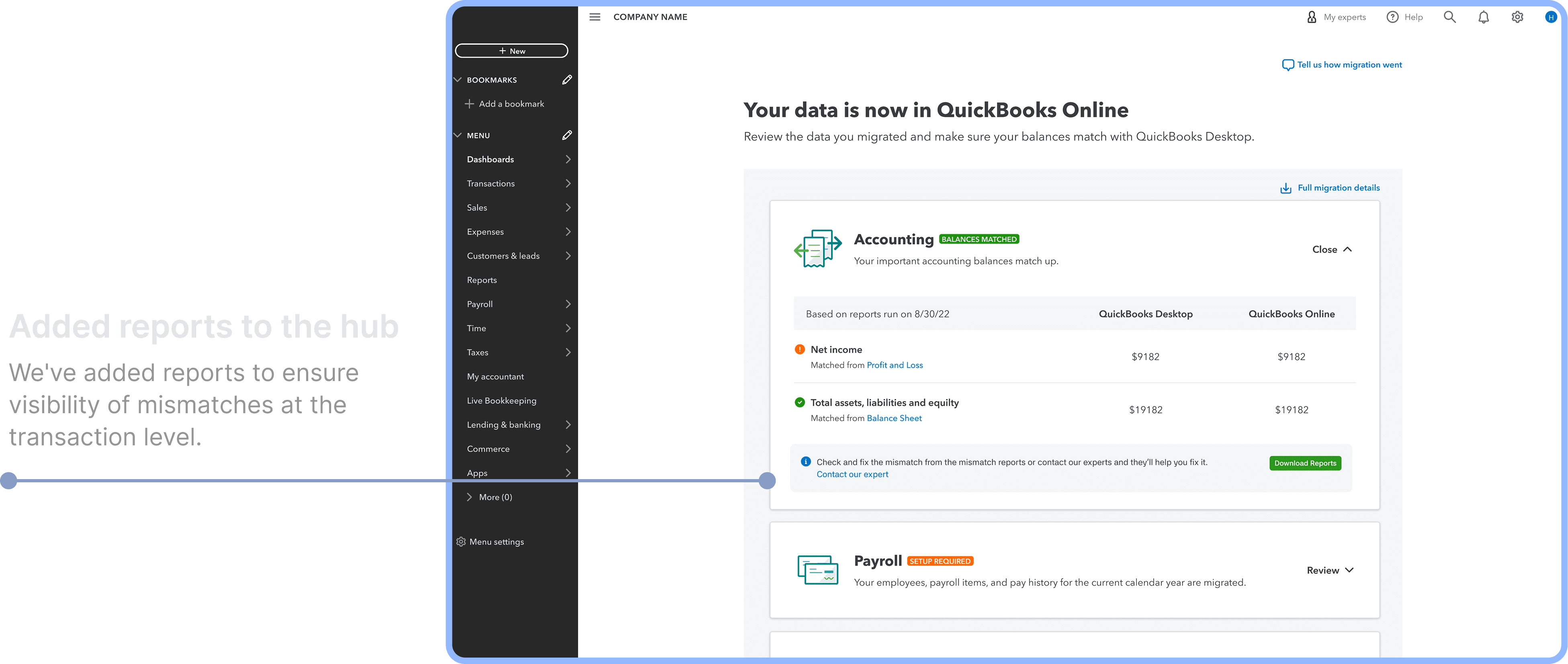
We have provided an access point for the full reports, which contain accounting mismatches at the transaction level. This report can be downloaded and used as a reference for users to correct accounting mismatches.
06
Deep dive sessions with tech teams
Deep dive sessions with tech teams
Understanding the reasons for mismatches
Understanding the reasons for mismatches
Feedback
Feedback
01
01
Operational methods cause discrepancies
Operational methods cause discrepancies
We've learned that the different operational methods of QuickBooks Desktop and QuickBooks Online are the major reason for the mismatches after migration.
We've learned that the different operational methods of QuickBooks Desktop and QuickBooks Online are the major reason for the mismatches after migration.
02
02
Show differences in values between Online and Desktop
QuickBooks Desktop used to give a lot of flexibility in terms of using the platform. Because of this, users would often mess up their data books. QuickBooks Online, however, comes with strong guidelines and doesn’t allow these kinds of files. Because of this, a lot of data was missing after migration.
QuickBooks Desktop used to give a lot of flexibility in terms of using the platform. Because of this, users would often mess up their data books. QuickBooks Online, however, comes with strong guidelines and doesn’t allow these kinds of files. Because of this, a lot of data was missing after migration.
03
03
We should also provide an explanation for mismatches
We should also provide an explanation for mismatches
The feature disparity between QuickBooks Online and QuickBooks Desktop was one of the major reasons for the data mismatch after migration.
The feature disparity between QuickBooks Online and QuickBooks Desktop was one of the major reasons for the data mismatch after migration.
07
Phase 2
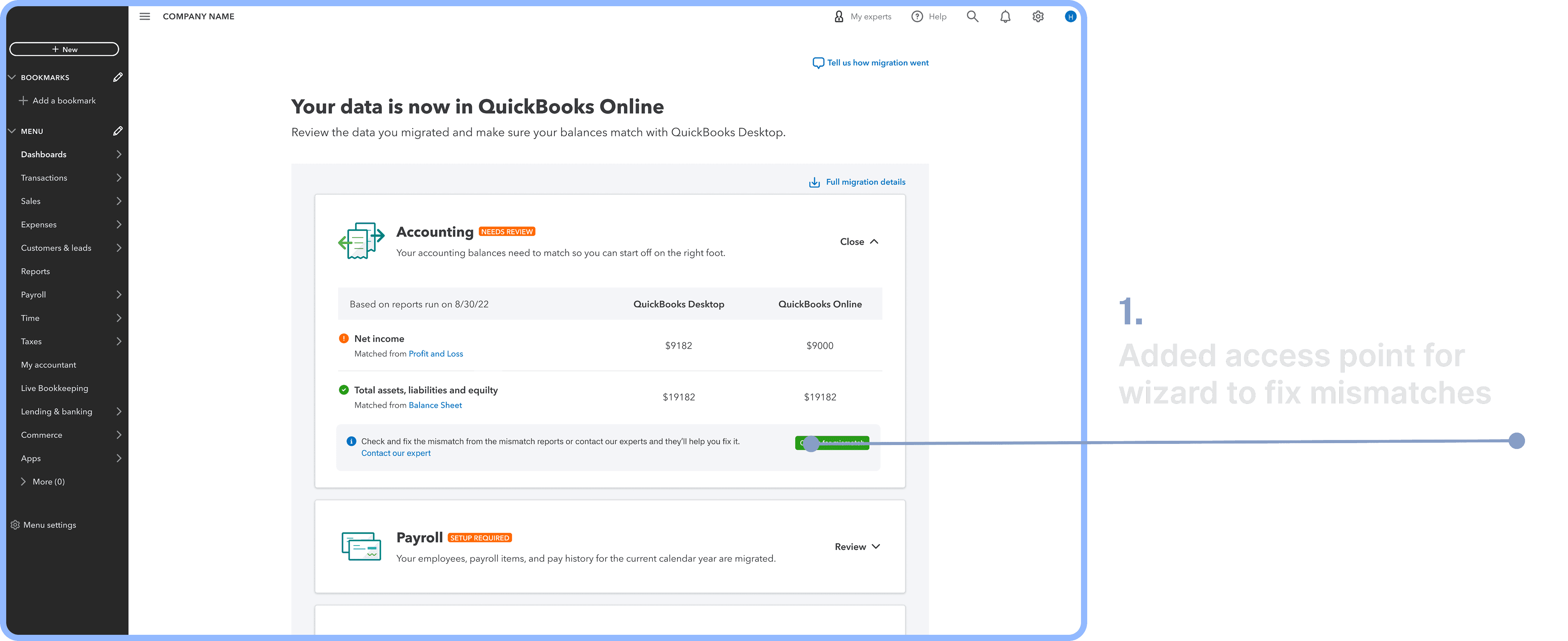
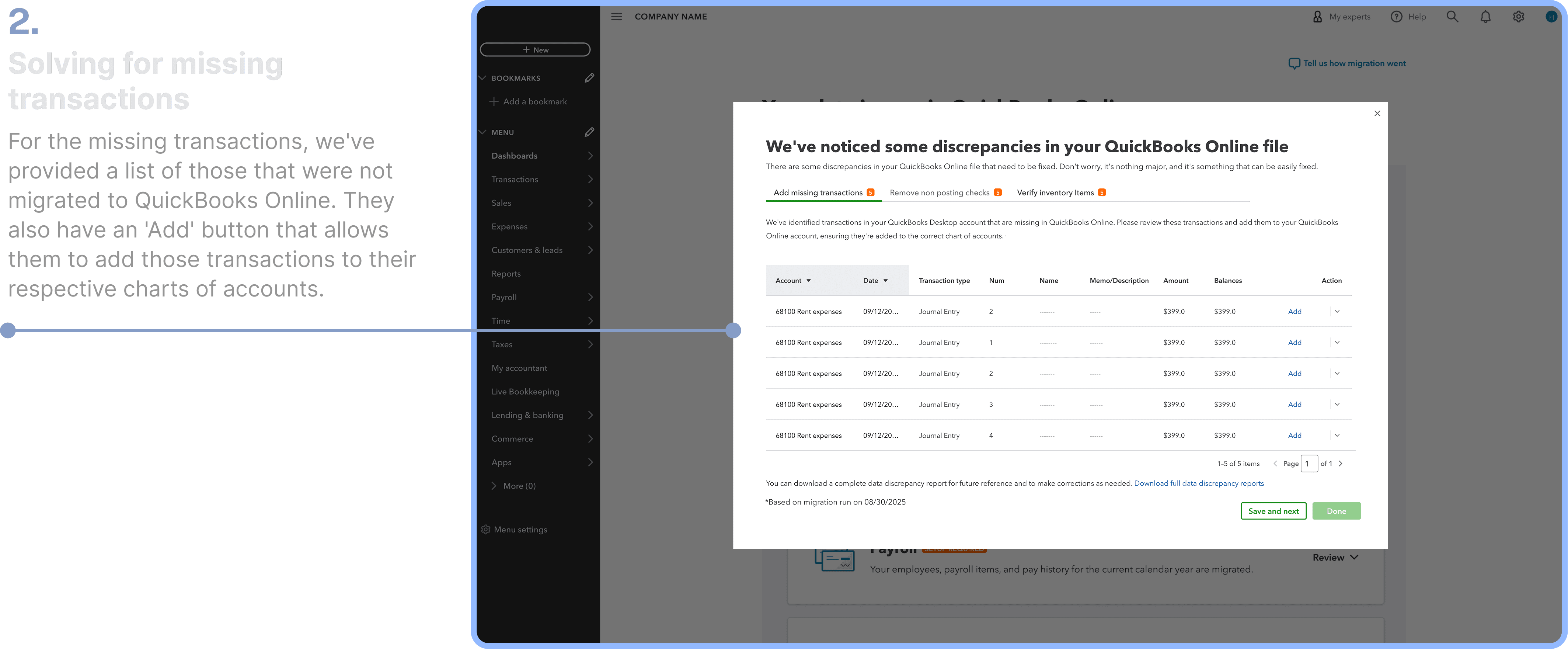
Solving for missing transactions and non posting checks
Solving for missing transactions and non posting checks
08
Usability Testing using usertesting .com
Usability Testing using usertesting .com
Feedback
Feedback
01
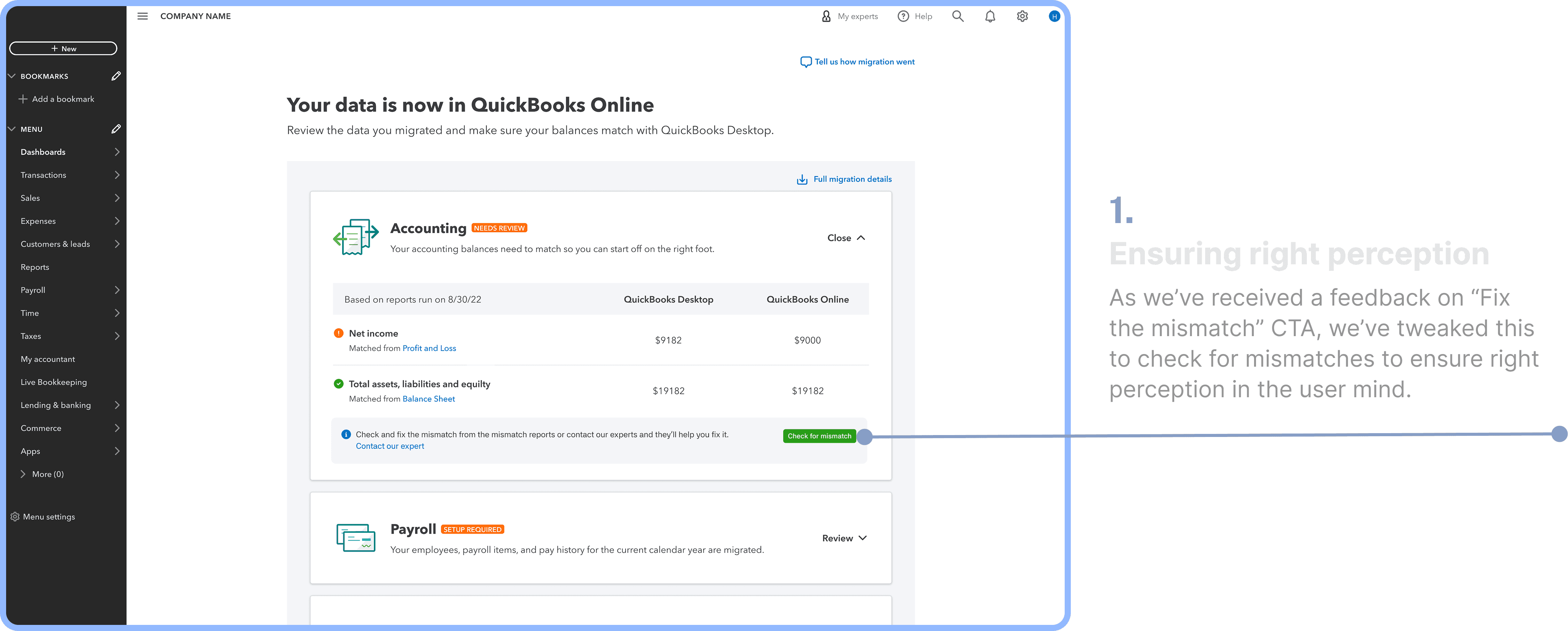
Confusion over "Fix the Mismatch" functionality
Confusion over "Fix the Mismatch" functionality
While most customers understood that the "Fix the mismatch" button would lead to a pop-up for manual entry, one customer mistakenly thought it would automatically resolve the issues.
While most customers understood that the "Fix the mismatch" button would lead to a pop-up for manual entry, one customer mistakenly thought it would automatically resolve the issues.
02
Users expect more emphasis on procedure
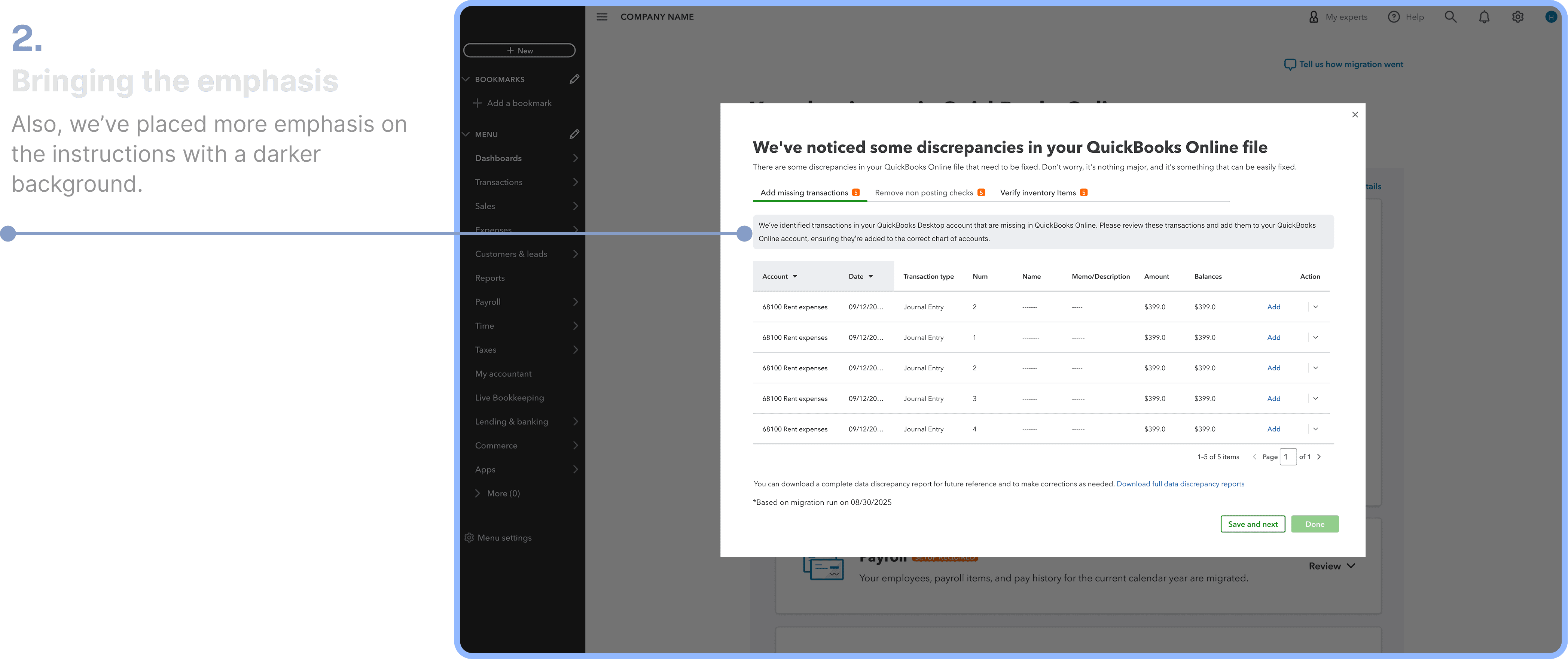
In designs, more emphasis should be placed on the information where we communicate the procedure. Additionally, providing step-by-step instructions may be more helpful.
In designs, more emphasis should be placed on the information where we communicate the procedure. Additionally, providing step-by-step instructions may be more helpful.
03
Expectations from "Add" button
Out of 14 customers, 12 expected that clicking the "Add" button would automatically correct the discrepancies. However, two customers believed that clicking "Add" would take them to a page where they could manually input a value.

09
Final touchup
Imlementing the feedbacks
Key Learing
Key Learing
I learned to plan projects and estimate time more effectively. I also now understand the value of quickly building an MVP to get user feedback and prefer to collaborate.
I learned to plan projects and estimate time more effectively. I also now understand the value of quickly building an MVP to get user feedback and prefer to collaborate.
Let’s collaborate.
Let’s collaborate.