Redefining QuickBooks Desktop

Post Migration Experience

Redefining QuickBooks Desktop
Post Migration Experience

The problem

The problem

After migrating from QuickBooks Desktop to QuickBooks Online, users often encounter numerous payroll data discrepancies. With no feedback post-migration, they only discover these issues when they attempt to use their payroll services. This lack of visibility into the migrated data used to cause significant frustration and overwhelm customer support with calls.

After migrating from QuickBooks Desktop to QuickBooks Online, users often encounter numerous payroll data discrepancies. With no feedback post-migration, they only discover these issues when they attempt to use their payroll services. This lack of visibility into the migrated data used to cause significant frustration and overwhelm customer support with calls.

People Impacted

People Impacted

People impacted by this problem were small and medium business owners who had recently migrated to QuickBooks Online from Desktop and used payroll services to manage their payroll.

The people impacted by this problem were small and medium business owners who had recently migrated to QuickBooks Online from Desktop and used payroll services to manage their payroll.

Business Goals

Business Goals

Provide accurate feedback to users on their data after migration. Enhance the migration experience to increase the conversion of the potential users from QuickBooks Desktop to QuickBooks Online.

Provide accurate feedback to users on their data after migration. Enhance the migration experience to increase the conversion of the potential users from QuickBooks Desktop to QuickBooks Online.

Design Process

Design Process

Delight for Design

Delight for Design

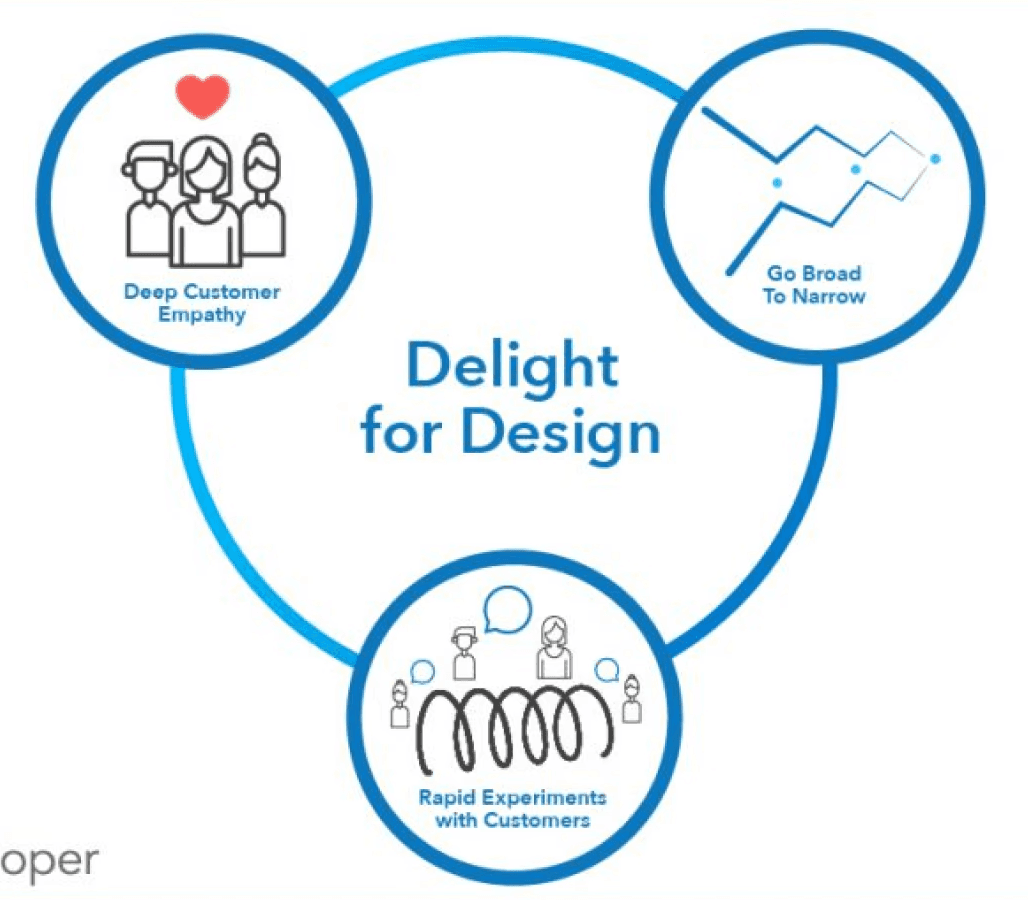
Design for Delight (D4D) is a framework based on three principles: Deep Customer Empathy, Go Broad to Go Narrow, and Rapid Experimentation. It focuses on understanding customer needs, generating diverse ideas, and quickly testing them for refinement.

Design for Delight (D4D) is a framework based on three principles: Deep Customer Empathy, Go Broad to Go Narrow, and Rapid Experimentation. It focuses on understanding customer needs, generating diverse ideas, and quickly testing them for refinement.

My role

My role

As the solo product designer for the post-migration hub redesign, I collaborated with cross-functional teams and led both customer studies and design delivery, transforming a manual, fragmented process into a streamlined, transparent experience.

As the solo product designer for the post-migration hub redesign, I collaborated with cross-functional teams and led both customer studies and design delivery, transforming a manual, fragmented process into a streamlined, transparent experience.

What is post migration hub?

What is post migration hub?

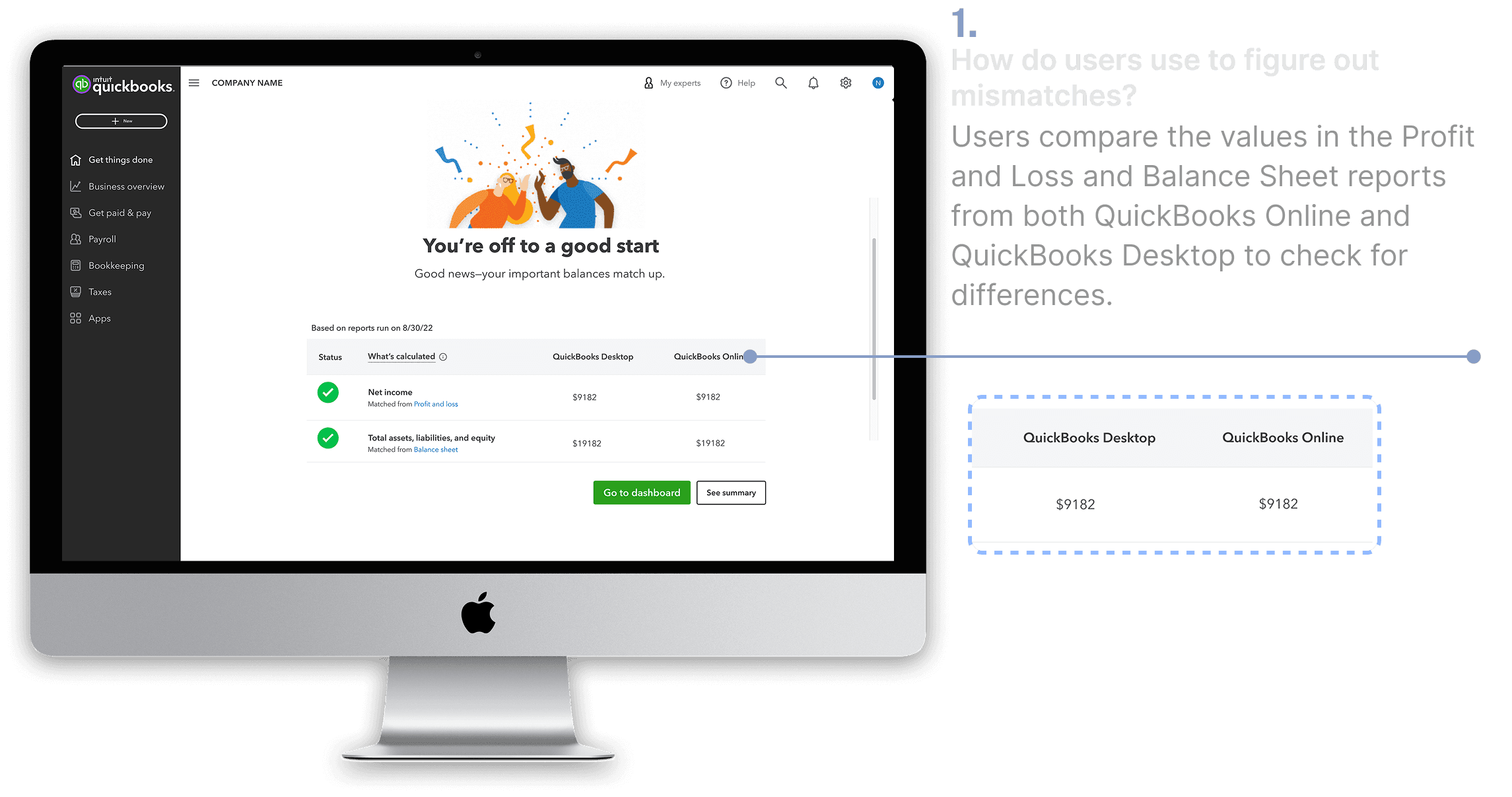
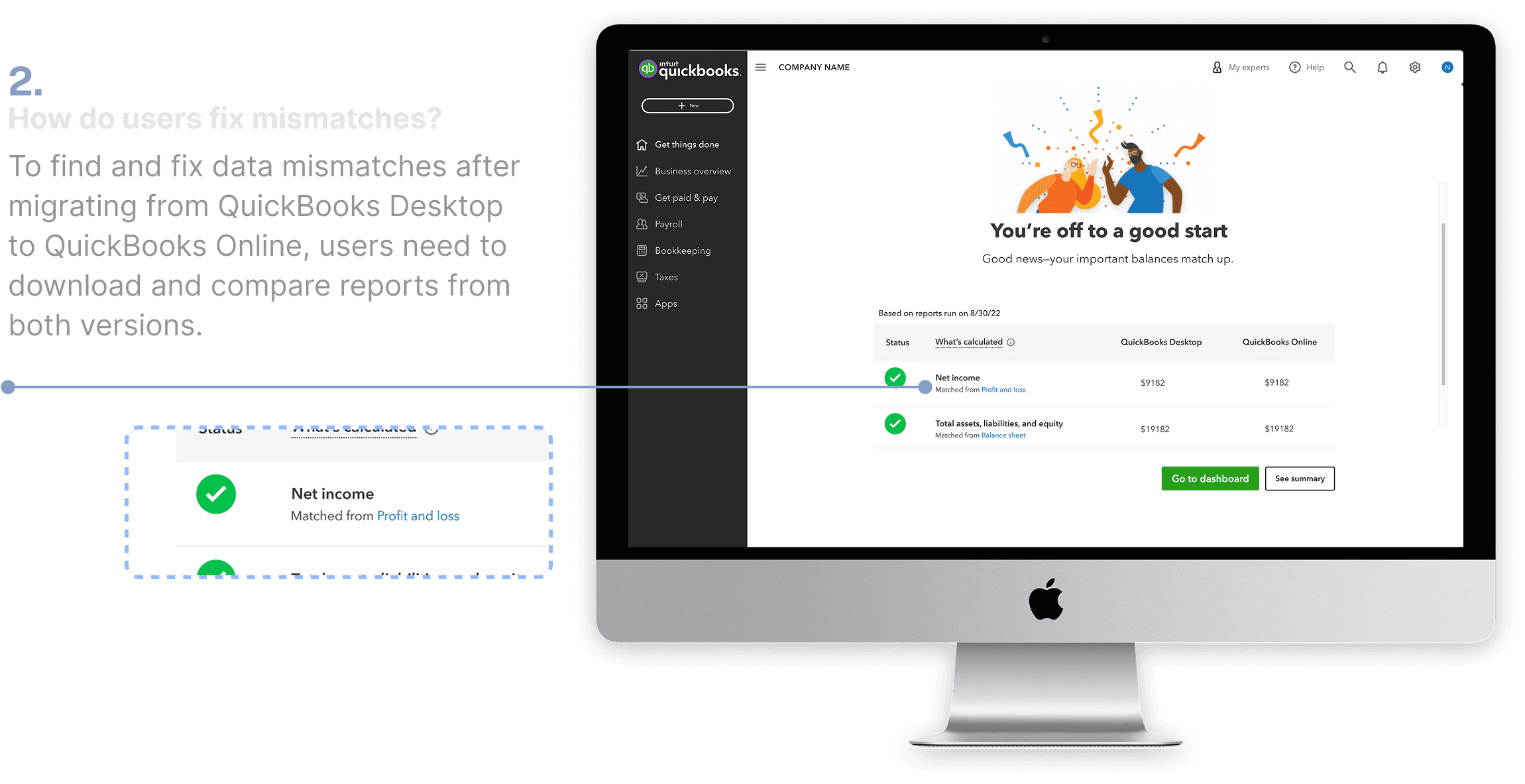
The post-migration hub is the first screen a user will see after migrating their data from QuickBooks Desktop to QuickBooks Online. The purpose of this screen is to provide the status of the migration and to reflect any data discrepancies in the migrated data.

The post-migration hub is the first screen a user will see after migrating their data from QuickBooks Desktop to QuickBooks Online. The purpose of this screen is to provide the status of the migration and to reflect any data discrepancies in the migrated data.

01

Initial state

Initial state

01

02

02

The gap

Post-migration hub gives feedback on users’ accounting data, but not payroll data, causing frustration since payroll is business-critical.

The gap

03

03

First round of user interviews

Insights

Insights

01

Users weren’t aware of the status in case of migration failure

Users don't know how to prepare their files for migration. They also don't realize when migrations fail because there's no communication about the outcome.

02

Data missing from reports

Users are reporting that financial data from the previous and current years is missing. This has left reports and historical records blank, which is a major concern for their upcoming payroll run.

03

Tedious data verification process

Users are finding it difficult to verify migrated data, as they are returning to the old system to manually compare reports and individual line items.

05

The ideal state

Users should be able to migrate 100% of their data without any discrepancies and start using the online platform without any additional steps.

06

Tech constraints

Because of technical constraints on the backend, a complete data migration wasn't possible. Therefore, we've decided to provide a place where users can view and fix any discrepancies in their payroll data after the migration is complete.

04

What user's were going through?

Users had to manually and frustratingly
compare every single line of my QuickBooks
Online reports against my old Desktop data.

From interviews, we understood that users would run reports in QuickBooks Online and then return to the old QuickBooks Desktop system to manually compare each line item to find mismatches. This used to take a lot of time and create a lot of frustration in the users' minds.

04

What user's were going through?

Users had to manually and frustratingly
compare every single line of my QuickBooks
Online reports against my old Desktop data.

From interviews, we understood that users would run reports in QuickBooks Online and then return to the old QuickBooks Desktop system to manually compare each line item to find mismatches. This used to take a lot of time and create a lot of frustration in the users' minds.

04

What user's were going through?

Users had to manually and frustratingly
compare every single line of my QuickBooks
Online reports against my old Desktop data.

From interviews, we understood that users would run reports in QuickBooks Online and then return to the old QuickBooks Desktop system to manually compare each line item to find mismatches. This used to take a lot of time and create a lot of frustration in the users' minds.

05

The ideal state

Users should be able to migrate 100% of their data without any discrepancies and start using the online platform without any additional steps.

06

Tech constraints

Because of technical constraints on the backend, a complete data migration wasn't possible. Therefore, we've decided to provide a place where users can view and fix any discrepancies in their payroll data after the migration is complete.

05

The ideal state

Users should be able to migrate 100% of their data without any discrepancies and start using the online platform without any additional steps.

06

Tech constraints

Because of technical constraints on the backend, a complete data migration wasn't possible. Therefore, we've decided to provide a place where users can view and fix any discrepancies in their payroll data after the migration is complete.

07

07

First iteration

Adding a payroll section in post migration hub
Adding a payroll section in post migration hub
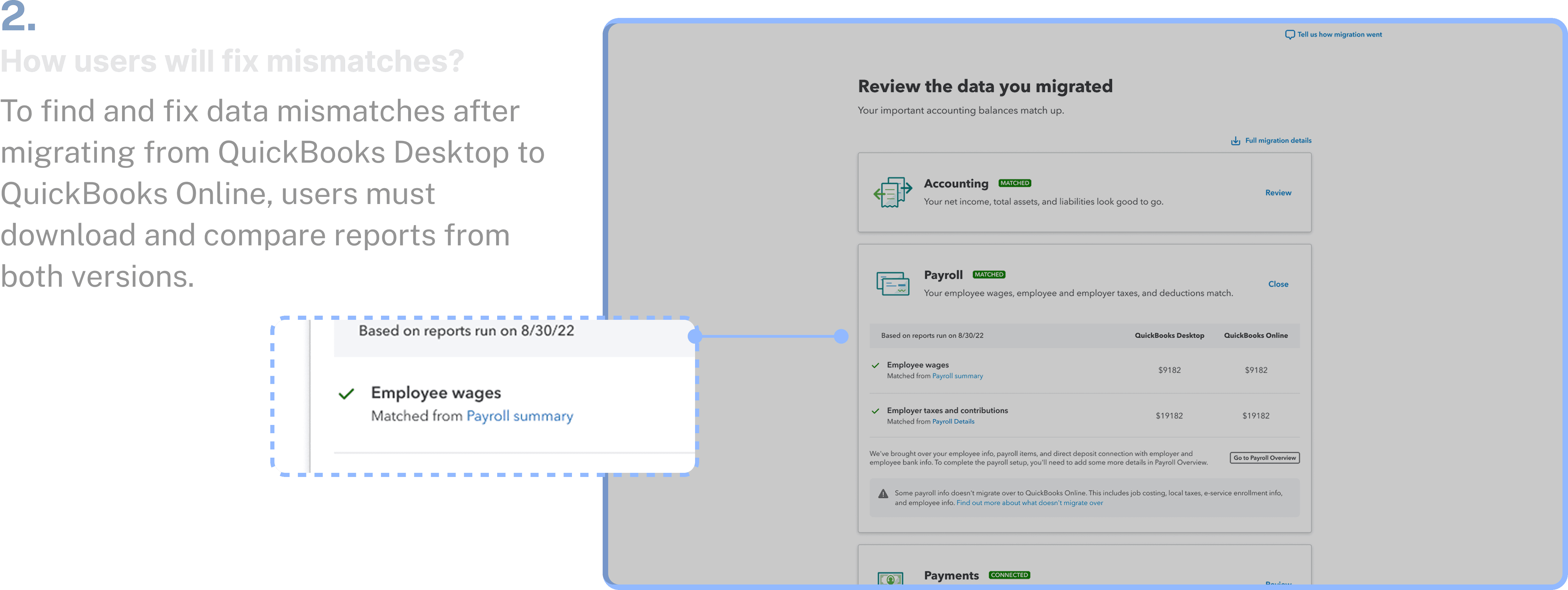
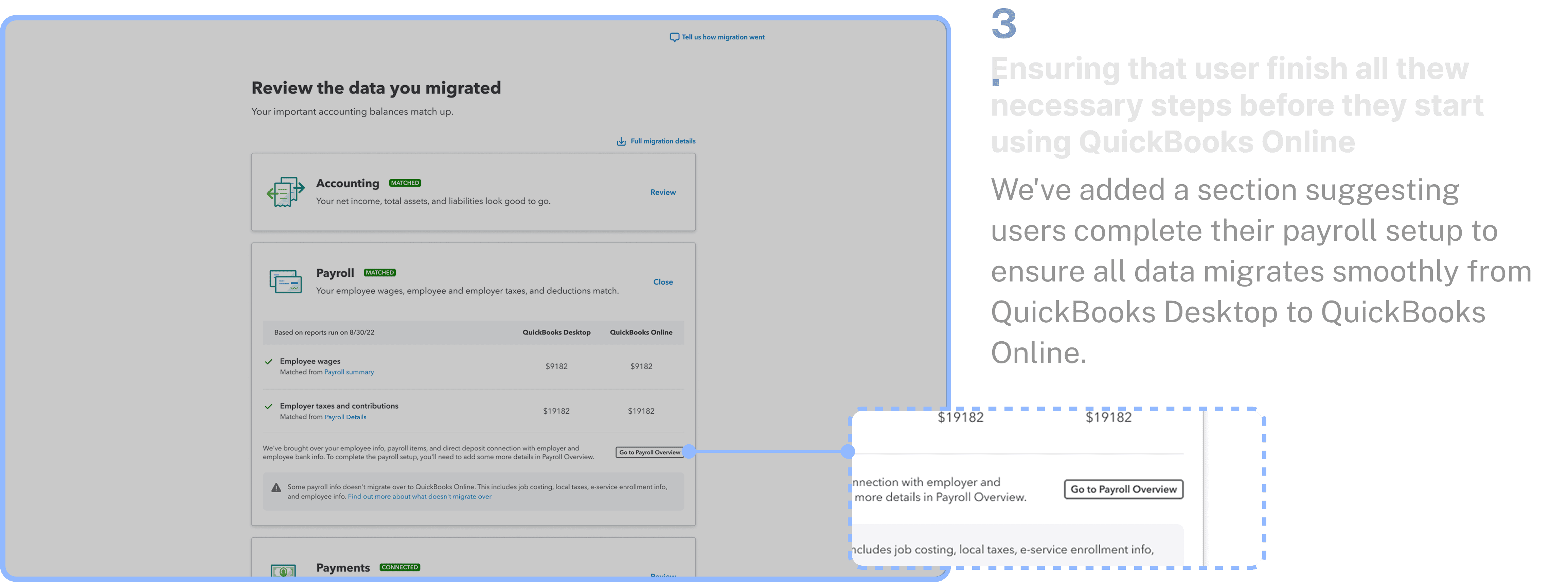
Adding a payroll section in post migration hub
08

Discussion

with tech teams

Tech POC showed payroll data is available only after setup

We learned from our recent test that we can't get payroll summary data directly from QuickBooks Online. Users will need to complete their payroll setup first, and then the cumulative values will appear.

09

Discussion
with marketing folks

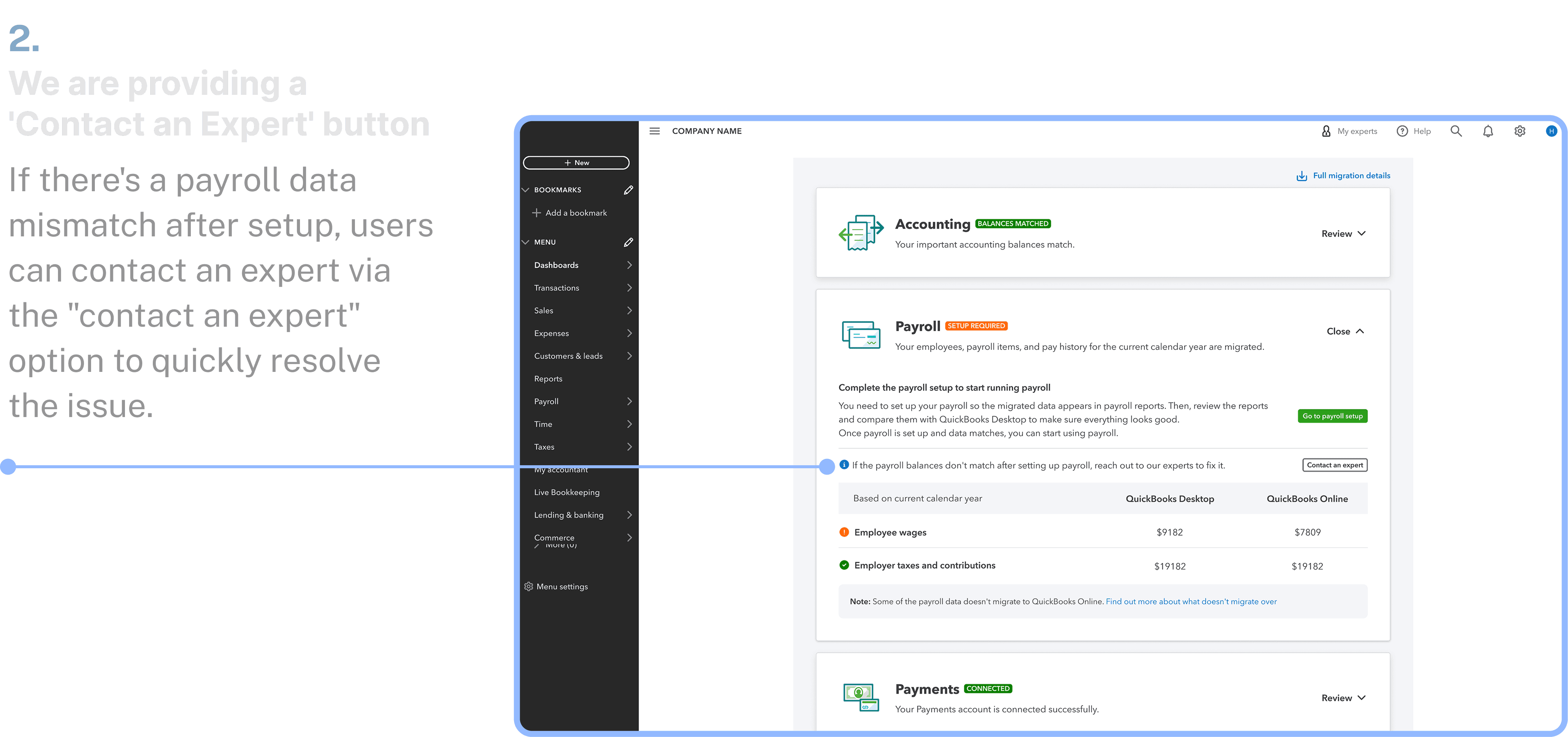
Marketing suggested a 'Contact an Expert' button in payroll for discrepancy support

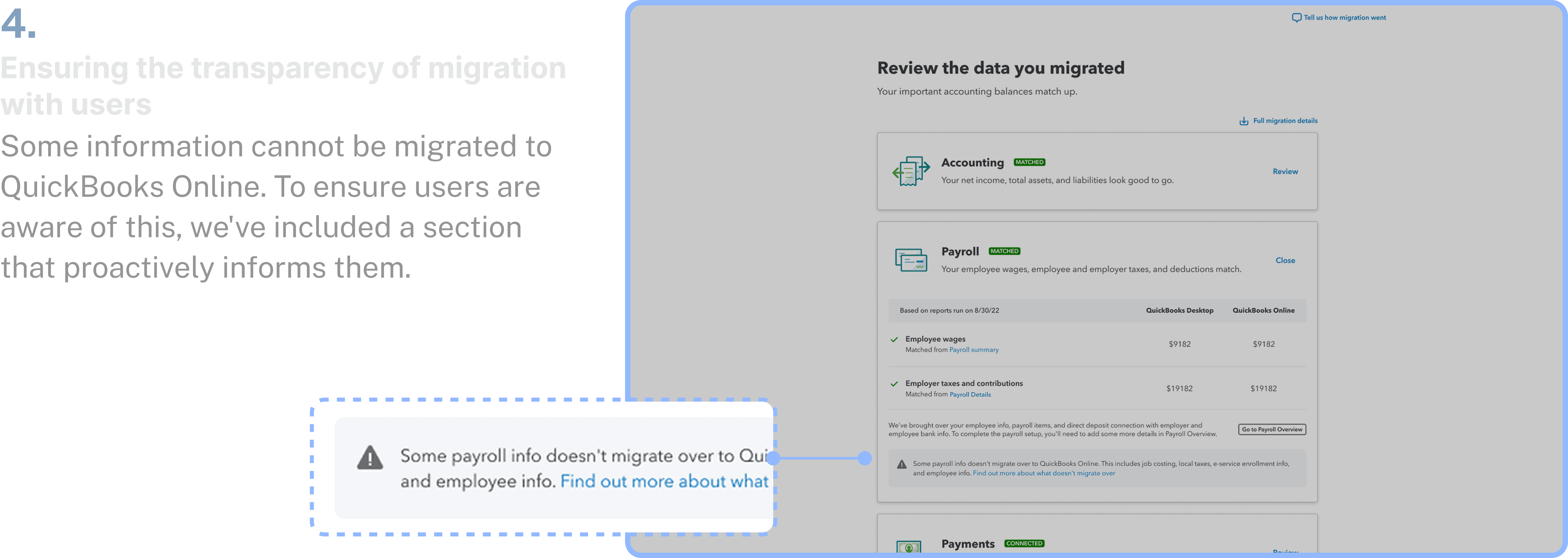
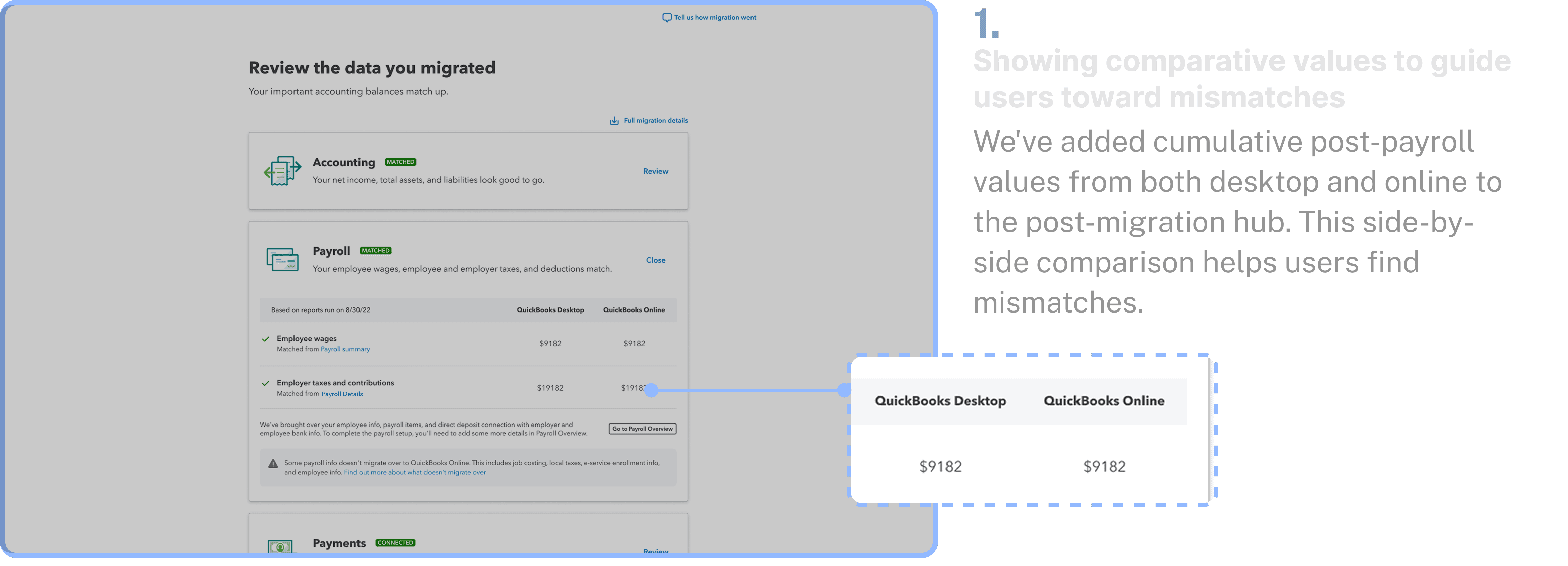
Marketing liked the concept and the desktop-online side-by-side comparison.

They appreciated the transparency showing the KB article on migration.

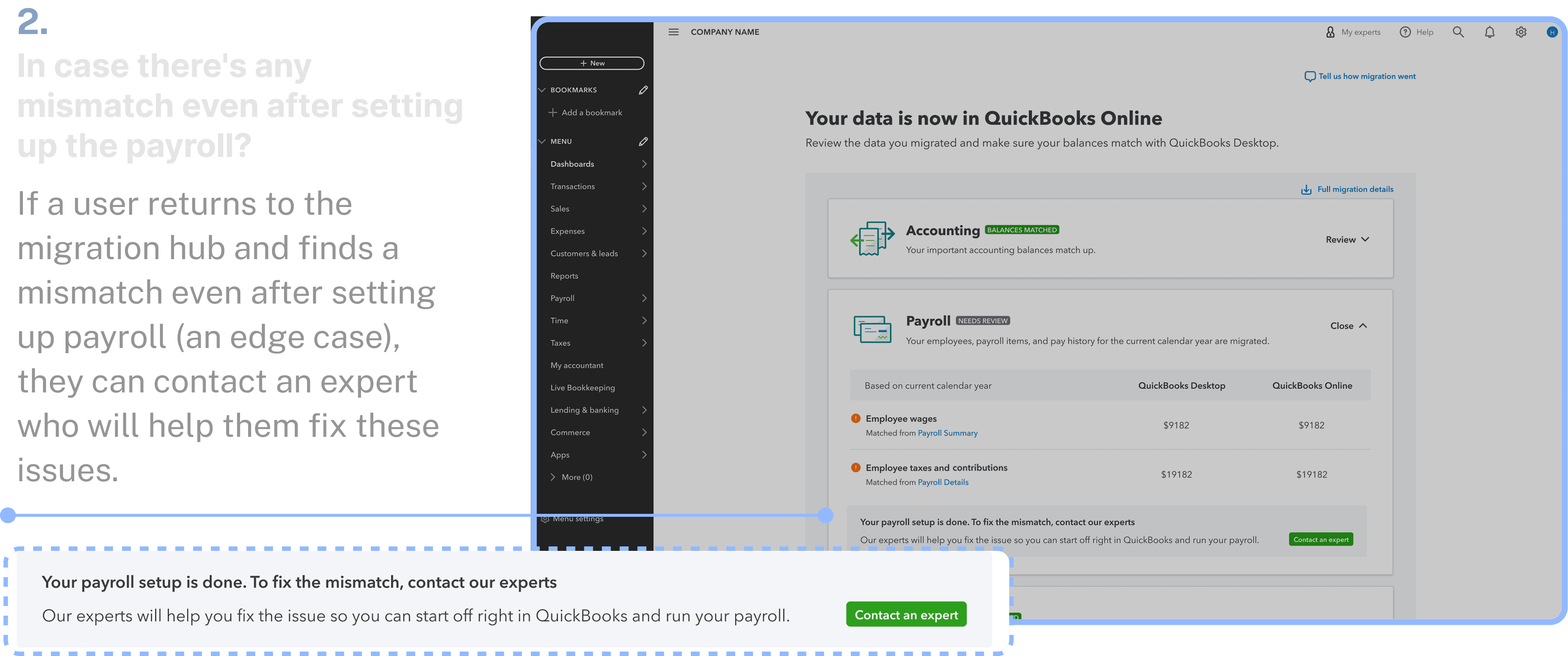
They suggested adding a 'Contact an Expert' button for customers facing issues even after payroll setup.

10

Second iteration

Ensuring users complete payroll setup before using our services
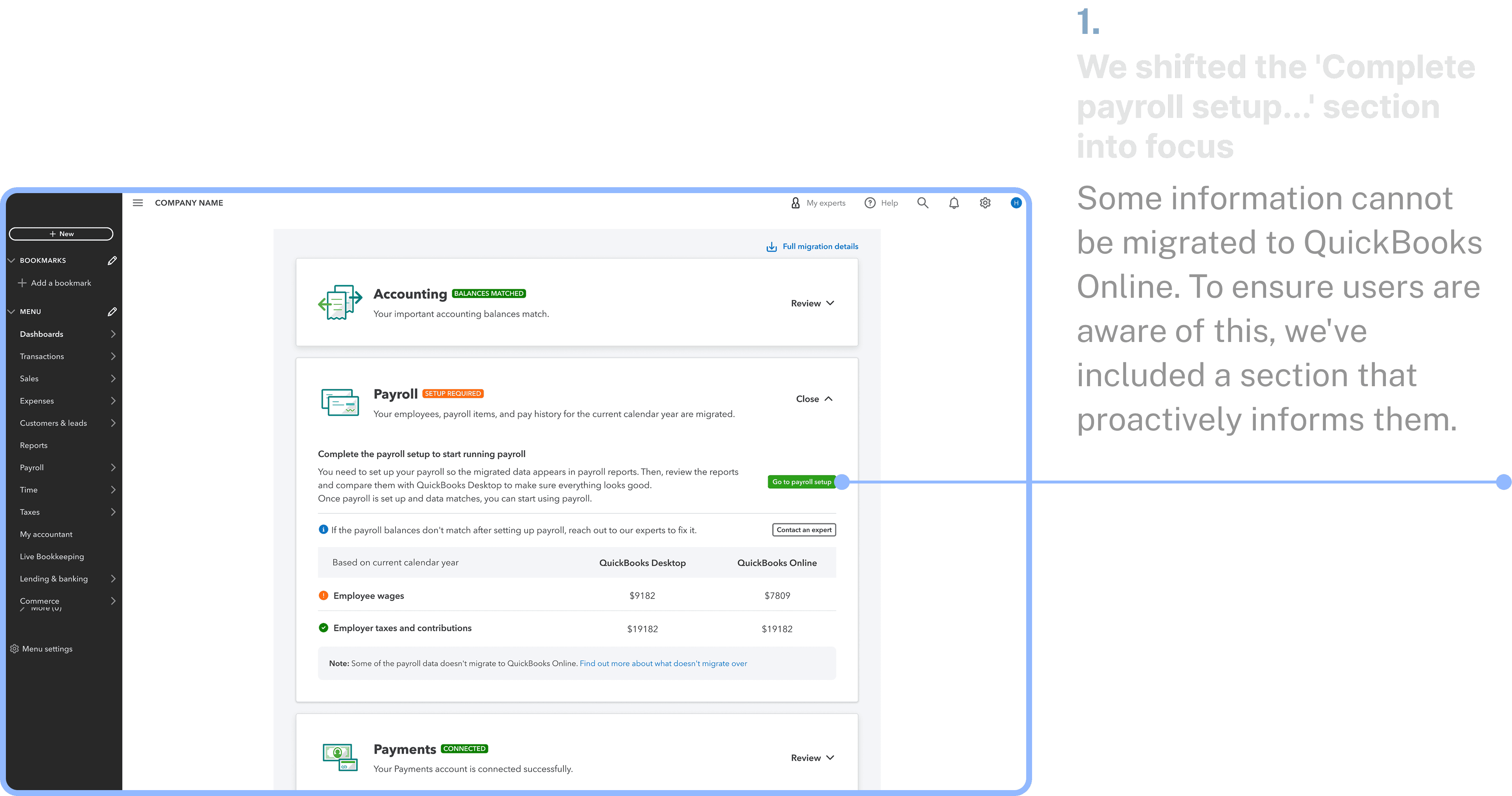
Ensuring users complete payroll setup before using our services
11

Second round of user interviews

Insights

01

Users want detailed payroll discrepancy data

Users were pleased to see comparative values for identifying payroll data mismatches, but they also requested more accurate, detailed data beyond the hub's overview.

02

They want to see a way to fix the discrepancies

Users had hoped QuickBooks Online would resolve or suggest fixes for the mismatches, but the proposed post-migration hub only provides feedback.

03

Mismatch Resolution vs. Payroll Setup

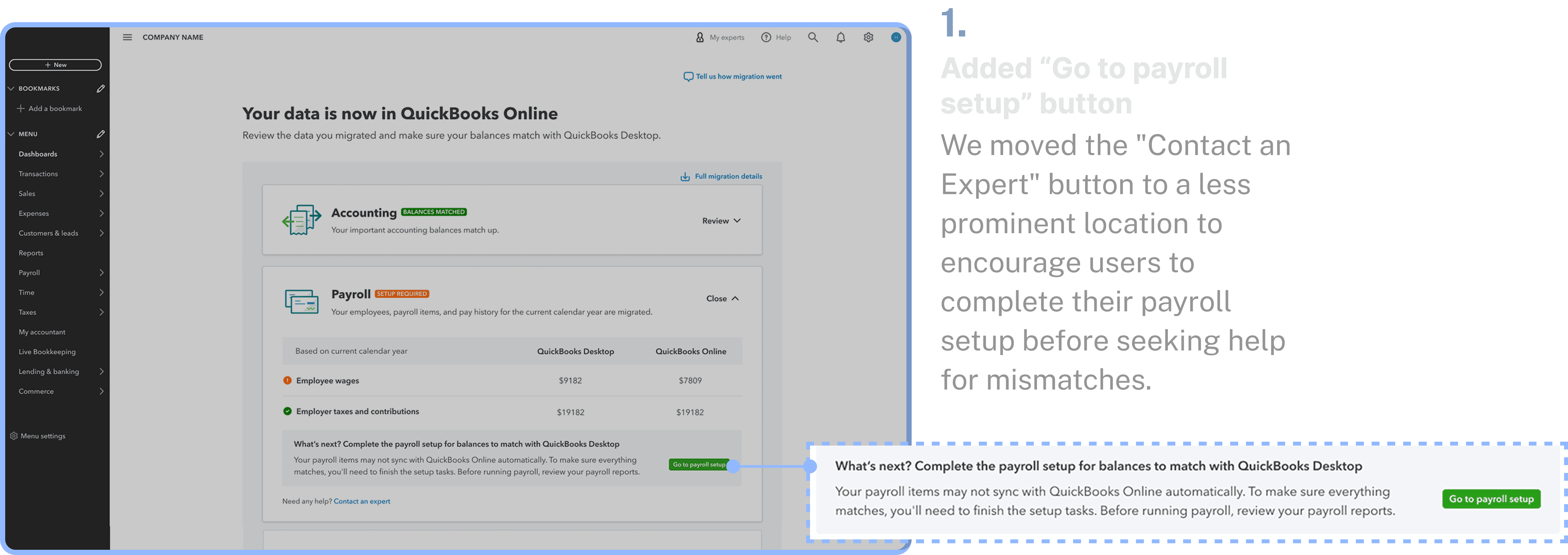
When users see a data mismatch, their first instinct is to contact an expert, but they need to complete payroll setup first. It is also unclear if the expert help is free.

12

What users felt?

User were really really happy to see the comparative values upfront this was helpful for them to identify the mismatches in the there payroll data.

12

What users felt?

User were really really happy to see the comparative values upfront this was helpful for them to identify the mismatches in the there payroll data.

13

Third iteration

Final touch to designs
14

The Impact

Evaluating effectiveness and efficiency

23%

Increase in unique visitors interacting with the page.

12%

Unique visitor resolved data discrepancies using the review section within

30 days of migration.

30%

Reduction on the care calls over a month.

Let’s collaborate.

Open to new roles.

14

The Impact

Evaluating effectiveness and efficiency

23%

Increase in unique visitors interacting with the page.

12%

Unique visitor resolved data discrepancies using the review section within

30 days of migration.

30%

Reduction on the care calls over a month.

13

Third iteration

Final touch to designs